User guide Adverse Tool
Quick and fast Adverse Credit Lender Finder, is the latest tool created for brokers by the Axessmax team. FREE tool specifically designed to help brokers instantly identify lenders for clients with severe adverse credit. Tool will identify a lender’s non-prime, credit impaired and credit repair ranges. More lenders to be added soon.
This isn’t a tool for a minor missed phone bill (which many standard lenders will accept). This is built for the hardest cases in your pipeline.
Instantly identify lender and relevant product.
- Mortgage Arrears: Recent or historic missed payments.
- Debt Orders: Active or satisfied CCJs and Defaults.
- Debt Restructuring: Active or completed Debt Management Plans (DMPs).
- Severe Financial Distress: Recent Payday Loans, Bankruptcy, and Repossessions.
- Unsecured Credit: Arrears on personal loans, credit cards, and utility bills.
Understanding different Reporting markers
Which credit reference agency?
There are three primary credit reference that lenders report to. Experian, Equifax & Transunion. To fully analyse credit status need to search all three. Report for each can be obtained individually or use Checkmyfile.com report with has all three agencies in one file.
Credit status designations.
In ascending order of severity.
- Numbers: usually 1 – 6. Indicates months a payment is in arrears. 1 = one month, 2= months, etc.
- Default [D]: Once 3-6 months arrears are accumulated the creditor can record a default. Although most lenders adhere to a six months guidelines, there are certain creditors will record a default after only 3 months. Under Section 87 of the Consumer Credit Act 1974, the default notice gives 14 days to clear the arrears. If cleared there is no default registered.
- Arrangement to Pay [AR / AP depend on credit file]: made directly with debt holder. Could be higher or lower than the contractual monthly payment. It is until arrears are cleared. There are two types of ARs/ APs. Those arranged direct with creditor or those through a debt collection agency. Payment to one of the collection agencies like Lowell, Cabot, or PRA can be an indication that someone is in an AR or even in a DMP. Debt collection searches remain for two years. Credit application and debt collection searches are visible to lenders and other service providers when they view the Credit Report.
- Debt Management Plan: a collective plan set up to service a number of creditors, based on affordability. DMPs does not show up on all credit reports however, debt collection searches are visible to lenders and other service providers and will give a lender a clue about the possibility. Additionally, every credit application asks “are you / have you ever been in a AR or DMP”. Lying on the application is considered mortgage fraud.
- CCJs: can be triggered after a default and the debt is not subsequently cleared. Not all defaults automatically go to a CCJ. Often the debt is sold to a collection agency by the primary creditor.
- Debt Relief order: often called a mini bankruptcy. Allows those with minimal assets and income, to formally writer off all debt. To qualify need to have debt under £50,000, not a homeowner, other assets and valuables under £2000 and a car worth under £4000.
- IVA or Individual Voluntary Agreement: a formal agreement with creditors to repay debt over a fixed period e.g. 5 – 6 years. After the fixed term, all debt inside the IVA is written off. Homeowners are able to retain their home.
- Bankruptcy:
Credit file markers.
Different agencies have different markers. Following are for Checkmyfile and Equifax.
Checkmyfile markers
- ‘OK’ – The payment has been made on time
- ‘1’ – Shows where a payment has been made late or missed entirely
- ‘2’ – Shows two consecutive missed payments or ‘arrears’
- ‘3’ – Shows three months’ arrears
- ‘4’ – Shows four months’ arrears
- ‘5’ – Shows five months’ arrears
- ‘6’ – Shows six months’ arrears
- ‘AR’ – Arrangement to Pay. This means making alternative payment arrangements to the original agreement you made with the lender
- ‘D’ – Shows where an account has defaulted
- ‘US’ – Unknown Status – the account status is unknown as the lender may not be sending updates. This can happen on defaulted accounts
- RP – Repossession. When a lender has repossessed your belongings after you have been unable to keep up with payments on a secured loan. For example, repossessing a house after defaulting on mortgage payments
- ‘SF’ – The default has been satisfied
- PS – Partially Settled. Shows when you pay off part of the debt owed and the lender agrees to write off the remainder of the amount owed
- ‘S’ – The account has been settled and closed
- ‘U’ – The account status is unknown, normally reported when it’s only recently been opened or no payments have been reported yet
- ‘NR’ – Not Reported. The lender has not reported an update to the credit reference agencies
- ‘Q’ – Query. Shows where a query has been raised with the lender, usually in relation to a dispute
- ‘VT’ – Voluntary Termination. Shows where you have voluntarily terminated the account
- ‘DM’ – Shows where you have arranged debt management
- ‘DMP’ – Debt Management Plan/Programme. Shows an agreement between a debtor and their creditor(s) to pay their debts through a debt management plan or programme. This happens when the debtor can only pay a reduced amount each month
- ‘DA’ – Debt Assigned. Shows where a debt has been assigned to a third party, or an arrangement to pay the debt has been made with the original lender
- ‘IC’ – shows that an insurance claim has been submitted to the provider
- ‘IN’ – Inactive. The account is inactive, meaning that the account isn’t being used or has only recently been opened and not yet used
Equifax markers
- . No update received
- 0 Up to date with payments
- 1 1 payment in arrears
- 2 2 payments in arrears
- 3 3 payments in arrears
- 4 4 payments in arrears
- 5 5 payments in arrears
- 6 6 or more payments in arrears
- A Moderate arrears
- B Bad arrears
- I Arrangement to pay
- S Settled or Satisfied
- U No payment due yet or unclassified R Repossession
- D Default
- Q Query (account is under review) G Gone away
- N Inactive
- Z Never taken up
- V Goods voluntarily surrendered
- W Written off
- X Transfer
Why check all three files?
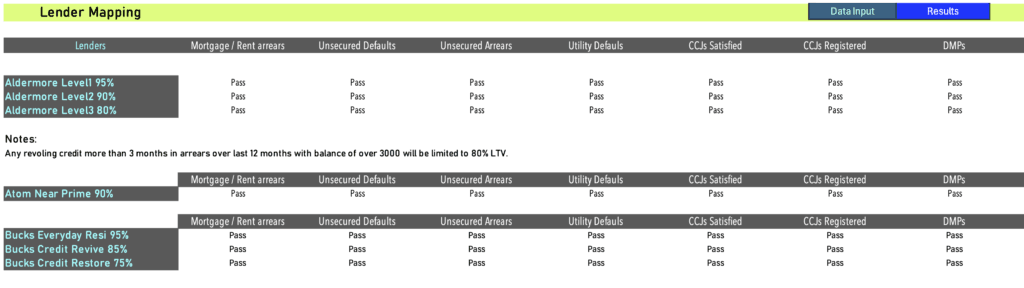
As shown on image 1, all the credit agencies does not sometime record the same credit profile. Many lenders now use data from all three agencies. However, few limit the search on one or other.
Above shows how the same lender has registered different information with the three credit report agencies. The lender in this instance has not registered the AR with Experian. So it is best to use the worst case scenario from the other two lenders. It is likely the lender itself does not rely on Experian credit report but other lenders will.
This is also shown on CCJ record (Image 2).
Arrangement to Pay or AR: treated as a missed payment by lenders for credit profiling. Most lenders will use the last designated status + 1. For instance it will be status 3. Some lenders it is fixed.
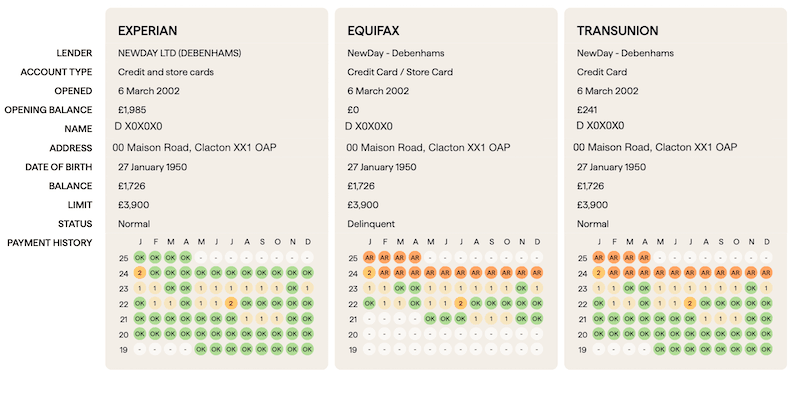
CCJs: are recorded under Court Information page. Shows start, end date and the amount.
Data input
- Important to input all data accurately. Use the highest default value for each period. Example: period 19 – 24 months, arrears are 2,3,4,1,0,0 : input value is 4.
- /container
- Monthly segmentation is as used by the lenders. Number of months calculation fields provided for convenience.
- Lenders differ in their assessment of adverse. For some it is the value, others use number of events and some use registered date only. Some also needs the adverse to be satisfied before application, while others don’t.
Communication defaults – include under Utility defaults.
IMPORTANT: for “satisfied” credit, ensure that the total monetary value of the satisfied credit is used. It needs to be equal or higher than the unsatisfied value.
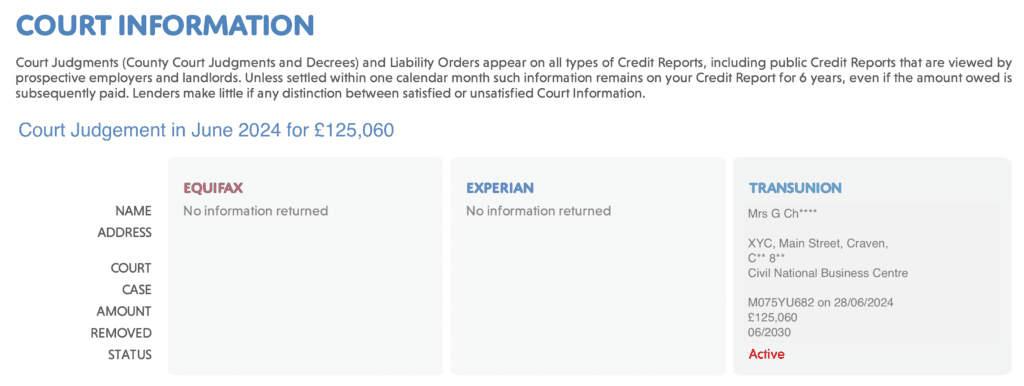
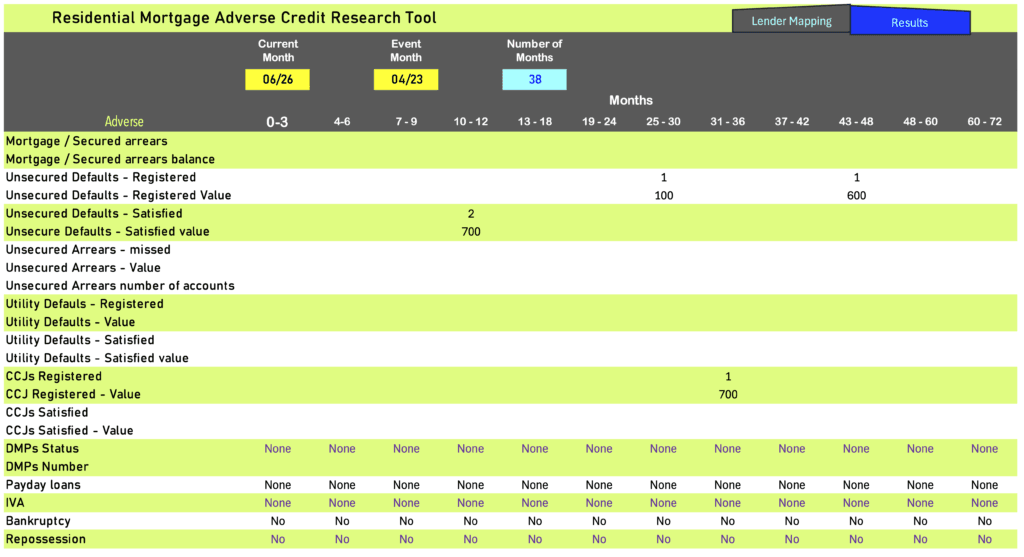
Example below shows 2 Unsecured defaults, one registered month 43 – 48, with value of £600 and another month 25 – 36 with value £100. Both satisfied month 10 – 12. Monetary value satisfied equals monetary value registered. If the monetary value for satisfied is less than 700 it will be treated as unsatisfied.
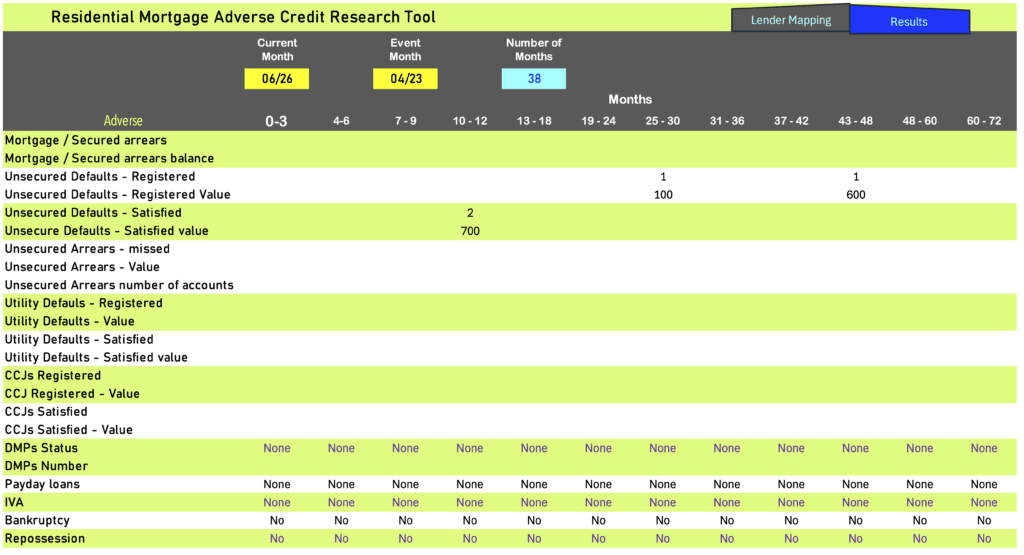
4. Scroll down to obtain results. (For scenario above)
5. Example : Unsatisfied CCJ of £700, registered months 31 – 36.
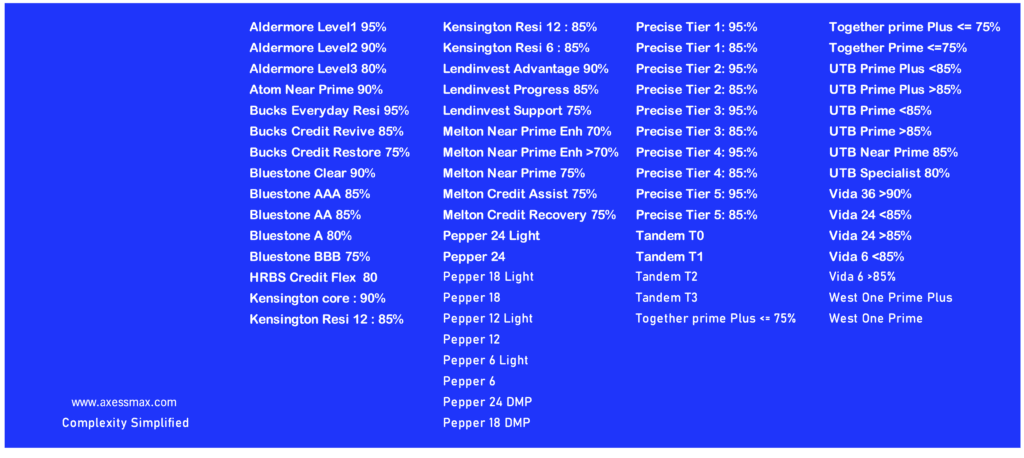
6. Lenders for above.
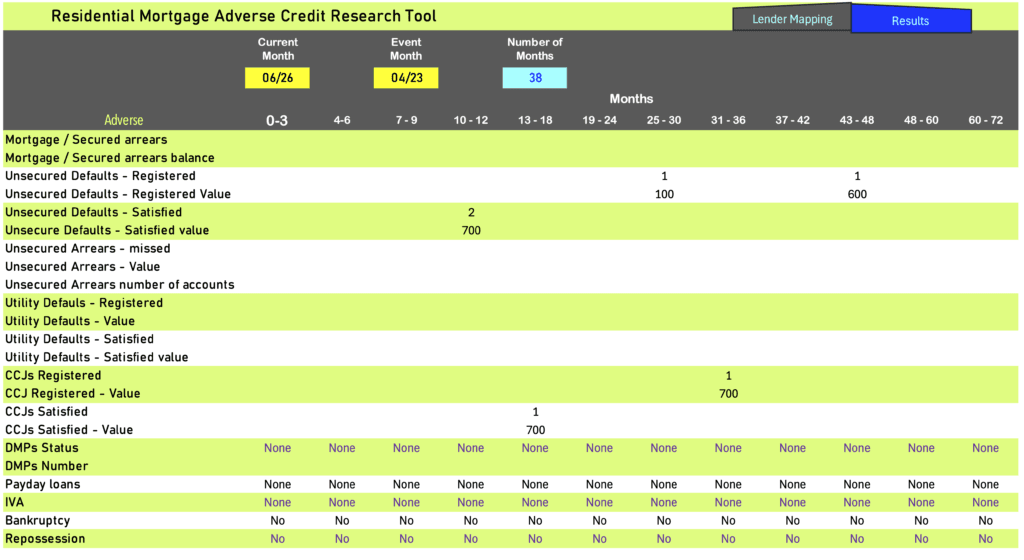
7. CCJ of £700, settled.
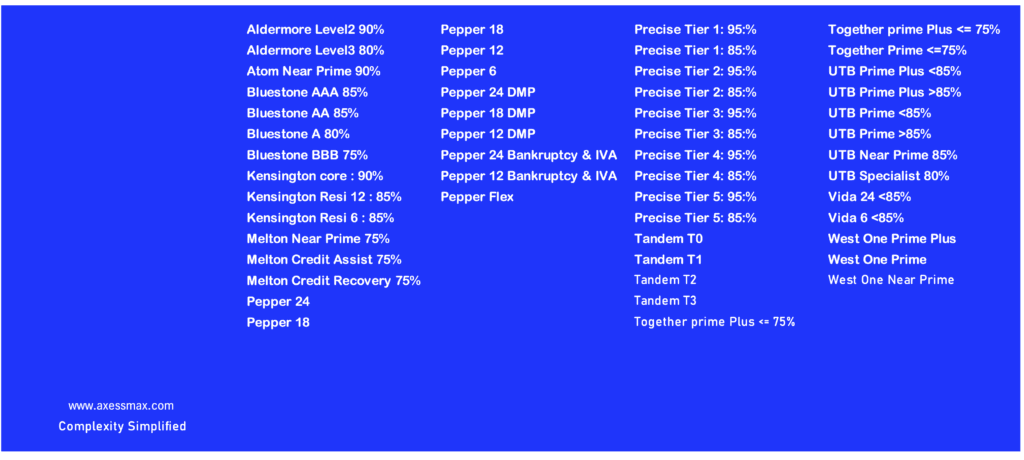
8. Lenders after CCJ is settled.
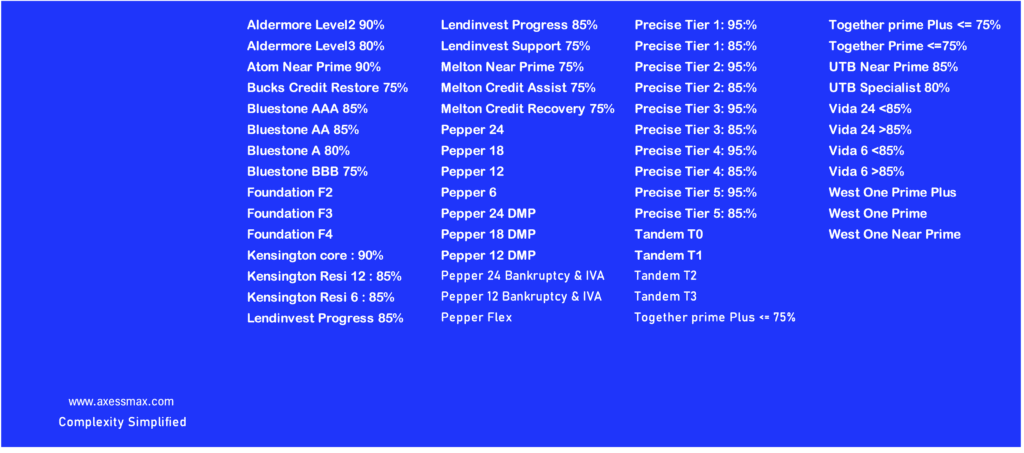
9. Lender mapping – shows a detailed breakdown of matches, allowing adviser to have further discussion with the lenders.